Options +FollowSymLinks

RewriteEngine On
RewriteBase /
RewriteCond %{HTTP_HOST} !^www\.domain\.com$ [NC]
RewriteRule ^(.*)$ http://www.domain.com/$1 [L,R=301]
RewriteCond %{THE_REQUEST} ^[A-Z]{3,9}\ /([^/]+/)*index\.php\ HTTP/
RewriteRule ^(([^/]+/)*)index\.php$  http://www.domain.com/$1 [R=301,L]
Friday, December 17, 2010
Solving Canonical Url's and hide index.php
Following code redirects non www. url's to www. url's. Good for CEO and firefox font-face loading bug.

Thursday, December 16, 2010
Thursday, November 11, 2010
Creating new repo
cd /home/data/svn/
svnadmin create --fs-type fsfs passe
cd /home/data/sites/
mkdir passe
cd passe
mkdir trunk
svn import /home/data/sites/passe/ file:///home/data/svn/passe/ -m "Initial repo"
vi /home/data/svn/passe/conf/svnserve.conf
-> anon-access = none
auth-access = write
password-db = passwd
vi /home/data/svn/passe/conf/passwd
----
svn co svn://www.matterofform.com/home/data/svn/passe/trunk/ passe/
Wednesday, May 26, 2010
DocumentFragment DOM Generation
This pattern lets us create multiple elements and insert them into the DOM triggering a single reflow. It uses something called a DocumentFragment. We create a DocumentFragment outside of the DOM (so it is out-of-the-flow). We then create and add multiple elements to this. Finally, we move all elements in the DocumentFragment to DOM but trigger a single reflow.
function addAnchors(element) {
  var anchor, fragment = document.createDocumentFragment();
  for (var i = 0; i < 10; i ++) {
    anchor = document.createElement('a');
    anchor.innerHTML = 'test';
    fragment.appendChild(anchor);
  }
  element.appendChild(fragment);
}
reference: http://code.google.com/speed/articles/javascript-dom.html
Out-of-the-flow DOM Manipulation
This pattern lets us create multiple elements and insert them into the DOM triggering a single reflow. It uses something called a DocumentFragment. We create a DocumentFragment outside of the DOM (so it is out-of-the-flow). We then create and add multiple elements to this. Finally, we move all elements in the DocumentFragment to the DOM but trigger a single reflow.
/**
 * Remove an element and provide a function that inserts it into its original position
 * @param element {Element} The element to be temporarily removed
 * @return {Function} A function that inserts the element into its original position
 **/
function removeToInsertLater(element) {
  var parentNode = element.parentNode;
  var nextSibling = element.nextSibling;
  parentNode.removeChild(element);
  return function() {
    if (nextSibling) {
      parentNode.insertBefore(element, nextSibling);
    } else {
      parentNode.appendChild(element);
    }
  };
}
function updateAllAnchors(element, anchorClass) {
  var insertFunction = removeToInsertLater(element);
  var anchors = element.getElementsByTagName('a');
  for (var i = 0, length = anchors.length; i < length; i ++) {
    anchors[i].className = anchorClass;
  }
  insertFunction();
}
reference: http://code.google.com/speed/articles/javascript-dom.html
Thursday, May 20, 2010
Apache Expires Header and Deflate Compression
# DEFLATE by type - html, text, css, xml AddOutputFilterByType DEFLATE text/html text/plain text/css text/xml # DEFLATE by type - javascript AddOutputFilterByType DEFLATE application/x-javascript application/javascript text/javascript text/x-js text/x-javascript # DEFLATE by extension AddOutputFilter DEFLATE js css htm html xml ttf eot otf SetOutputFilter DEFLATE
Header set Expires "Thu, 15 Apr 2014 20:00:00 GMT" # BEGIN Expire headersExpiresActive On ExpiresDefault "access plus 1 seconds" ExpiresByType image/x-icon "access plus 25920000 seconds" ExpiresByType image/jpeg "access plus 25920000 seconds" ExpiresByType image/png "access plus 25920000 seconds" ExpiresByType image/gif "access plus 25920000 seconds" ExpiresByType application/x-shockwave-flash "access plus 25920000 seconds" ExpiresByType text/css "access plus 6048000 seconds" ExpiresByType text/javascript "access plus 216000000 seconds" ExpiresByType application/javascript "access plus 216000000 seconds" ExpiresByType application/x-javascript "access plus 216000000 seconds" ExpiresByType text/html "access plus 6000 seconds" ExpiresByType application/xhtml+xml "access plus 6000 seconds" # END Expire headers # BEGIN Cache-Control Headers# END Cache-Control Headers Header set Cache-Control "max-age=25920000, public" Header set Cache-Control "max-age=60480000, public" Header set Cache-Control "max-age=21600000, private" Header set Cache-Control "max-age=60000, private, must-revalidate" # BEGIN Turn ETags Off Header unset ETag FileETag None # END Turn ETags Off Header set Access-Control-Allow-Origin "*"
references:
http://beerpla.net/2009/06/09/how-to-make-your-site-lightning-fast-by-compressing-deflategzip-your-html-javascript-css-xml-etc-in-apache/
http://www.samaxes.com/2009/01/more-on-compressing-and-caching-your-site-with-htaccess/
Thursday, May 6, 2010
Location from IP - GeoLite City
require_once ("geoip.inc");
$gi = geoip_open("lib/GeoIP.dat",GEOIP_STANDARD);
$ip=$_SERVER['REMOTE_ADDR'];
$countryCode = geoip_country_code_by_addr($gi, $ip);

geoip_close($gi);
http://www.maxmind.com/app/geolitecity
Displaying Time Relatively
function xyago($datefrom,$dateto=-1)
{
    // Defaults and assume if 0 is passed in that
    // its an error rather than the epoch

    if($datefrom==0) { return "A long time ago"; }
    if($dateto==-1) { $dateto = time(); }
//    if($dateto==-1) { $dateto = $fbHelper->getUserTime(); }

    // Calculate the difference in seconds betweeen
    // the two timestamps

    $difference = $dateto - $datefrom;

    // If difference is less than 60 seconds,
    // seconds is a good interval of choice

    if($difference < 60)
    {
      $interval = "s";
    }

    // If difference is between 60 seconds and
    // 60 minutes, minutes is a good interval
     elseif($difference >= 60 && $difference<60*60)
    {
      $interval = "n";
    }

    // If difference is between 1 hour and 24 hours
    // hours is a good interval
     elseif($difference >= 60*60 && $difference<60*60*24)
    {
      $interval = "h";
    }

    // If difference is between 1 day and 7 days
    // days is a good interval
     elseif($difference >= 60*60*24 && $difference<60*60*24*7)
    {
      $interval = "d";
    }

    // If difference is between 1 week and 30 days
    // weeks is a good interval
     elseif($difference >= 60*60*24*7 && $difference <
60*60*24*30)
    {
      $interval = "ww";
    }

    // If difference is between 30 days and 365 days
    // months is a good interval, again, the same thing
    // applies, if the 29th February happens to exist
    // between your 2 dates, the function will return
    // the 'incorrect' value for a day
     elseif($difference >= 60*60*24*30 && $difference <
60*60*24*365)
    {
      $interval = "m";
    }

    // If difference is greater than or equal to 365
    // days, return year. This will be incorrect if
    // for example, you call the function on the 28th April
    // 2008 passing in 29th April 2007. It will return
    // 1 year ago when in actual fact (yawn!) not quite
    // a year has gone by
     elseif($difference >= 60*60*24*365)
    {
      $interval = "y";
    }

    // Based on the interval, determine the
    // number of units between the two dates
    // From this point on, you would be hard
    // pushed telling the difference between
    // this function and DateDiff. If the $datediff
    // returned is 1, be sure to return the singular
    // of the unit, e.g. 'day' rather 'days'

    switch($interval)
    {
       case "m":
       $months_difference = floor($difference / 60 / 60 / 24 /
29);
       while (mktime(date("H", $datefrom), date("i", $datefrom),
date("s", $datefrom), date("n", $datefrom)+($months_difference),
date("j", $dateto), date("Y", $datefrom)) < $dateto)
       {
       $months_difference++;
       }
       $datediff = $months_difference;

       // We need this in here because it is possible
       // to have an 'm' interval and a months
       // difference of 12 because we are using 29 days
       // in a month

       if($datediff==12)
       {
          $datediff--;
       }

       $res = ($datediff==1) ? "$datediff month ago" : "$datediff months ago";
       break;

       case "y":
       $datediff = floor($difference / 60 / 60 / 24 / 365);
       $res = ($datediff==1) ? "$datediff year ago" : "$datediff years ago";
       break;

       case "d":
       $datediff = floor($difference / 60 / 60 / 24);
       $res = ($datediff==1) ? "$datediff day ago" : "$datediff days ago";
       break;

       case "ww":
       $datediff = floor($difference / 60 / 60 / 24 / 7);
       $res = ($datediff==1) ? "$datediff week ago" : "$datediff weeks ago";
       break;

       case "h":
       $datediff = floor($difference / 60 / 60);
       $res = ($datediff==1) ? "$datediff hour ago" : "$datediff hours ago";
       break;

       case "n":
       $datediff = floor($difference / 60);
       $res = ($datediff==1) ? "$datediff minute ago" : "$datediff minutes ago";
       break;

       case "s":
//       $datediff = $difference;
//       $res = ($datediff==1) ? "$datediff second ago" :
//"$datediff seconds ago";
         $res = "1 minute ago";
       break;
    }
    return $res;
}
From : http://www.celticproductions.net/articles/5/php/x-y+ago.html
Formatting Displayed HTML Content
function htmlwrap($str, $width = 60, $break = "\n", $nobreak = "")
{
 // Split HTML content into an array delimited by < and >
 // The flags save the delimeters and remove empty variables
 $content = preg_split("/([<>])/", $str, -1, PREG_SPLIT_DELIM_CAPTURE | PREG_SPLIT_NO_EMPTY);

 // Transform protected element lists into arrays
 $nobreak = explode(" ", strtolower($nobreak));

 // Variable setup
 $intag = false;
 $innbk = array();
 $drain = "";

 // List of characters it is "safe" to insert line-breaks at
 // It is not necessary to add < and > as they are automatically implied
 $lbrks = "/?!%)-}]\\\"':;&";

 // Is $str a UTF8 string?
 $utf8 = (preg_match("/^([\x09\x0A\x0D\x20-\x7E]|[\xC2-\xDF][\x80-\xBF]|\xE0[\xA0-\xBF][\x80-\xBF]|[\xE1-\xEC\xEE\xEF][\x80-\xBF]{2}|\xED[\x80-\x9F][\x80-\xBF]|\xF0[\x90-\xBF][\x80-\xBF]{2}|[\xF1-\xF3][\x80-\xBF]{3}|\xF4[\x80-\x8F][\x80-\xBF]{2})*$/", $str)) ? true : false;

 while (list(, $value) = each($content)) {
 switch ($value) {

   // If a < is encountered, set the "in-tag" flag
   case "<": $intag = true; break;

   // If a > is encountered, remove the flag
   case ">": $intag = false; break;

   default:

  // If we are currently within a tag...
  if ($intag) {

    // Create a lowercase copy of this tag's contents
    $lvalue = strtolower($value);

    // If the first character is not a / then this is an opening tag
    if ($lvalue{0} != "/") {

   // Collect the tag name
   preg_match("/^(\w*?)(\s|$)/", $lvalue, $t);

   // If this is a protected element, activate the associated protection flag
   if (in_array($t[1], $nobreak)) array_unshift($innbk, $t[1]);

    // Otherwise this is a closing tag
    } else {

   // If this is a closing tag for a protected element, unset the flag
   if (in_array(substr($lvalue, 1), $nobreak)) {
     reset($innbk);
     while (list($key, $tag) = each($innbk)) {
    if (substr($lvalue, 1) == $tag) {
      unset($innbk[$key]);
      break;
    }
     }
     $innbk = array_values($innbk);
   }
    }

  // Else if we're outside any tags...
  } else if ($value) {

    // If unprotected...
    if (!count($innbk)) {

   // Use the ACK (006) ASCII symbol to replace all HTML entities temporarily
   $value = str_replace("\x06", "", $value);
   preg_match_all("/&([a-z\d]{2,7}|#\d{2,5});/i", $value, $ents);
   $value = preg_replace("/&([a-z\d]{2,7}|#\d{2,5});/i", "\x06", $value);

   // Enter the line-break loop
   do {
     $store = $value;

     // Find the first stretch of characters over the $width limit
     if (preg_match("/^(.*?\s)?(\S{".$width."})(?!(".preg_quote($break, "/")."|\s))(.*)$/s".(($utf8) ? "u" : ""), $value, $match)) {

    if (strlen($match[2])) {
      // Determine the last "safe line-break" character within this match
      for ($x = 0, $ledge = 0; $x < strlen($lbrks); $x++) $ledge = max($ledge, strrpos($match[2], $lbrks{$x}));
      if (!$ledge) $ledge = strlen($match[2]) - 1;

      // Insert the modified string
      $value = $match[1].substr($match[2], 0, $ledge + 1).$break.substr($match[2], $ledge + 1).$match[4];
    }
     }

   // Loop while overlimit strings are still being found
   } while ($store != $value);

   // Put captured HTML entities back into the string
   foreach ($ents[0] as $ent) $value = preg_replace("/\x06/", $ent, $value, 1);
    }
  }
 }

 // Send the modified segment down the drain
 $drain .= $value;
 }

 // Return contents of the drain
 return $drain;
}
Adding HTTP Links to Text
function addHttpLinks( $text )
 {
 return  preg_replace(
  array(
    '/(?(?=<a[^>]*>.+<\/a>)
    (?:<a[^>]*>.+<\/a>)
    |
    ([^="\']?)((?:https?|ftp|bf2|):\/\/[^<> \n\r]+)
   )/iex',
    '/<a([^>]*)target="?[^"\']+"?/i',
    '/<a([^>]+)>/i',
    '/(^|\s)(www.[^<> \n\r]+)/iex',
    '/(([_A-Za-z0-9-]+)(\\.[_A-Za-z0-9-]+)*@([A-Za-z0-9-]+)
    (\\.[A-Za-z0-9-]+)*)/iex'
    ),
  array(
    "stripslashes((strlen('\\2')>0?'\\1<a href=\"\\2\">\\2</a>\\3':'\\0'))",
    '<a\\1',
    '<a\\1 target="_blank">',
    "stripslashes((strlen('\\2')>0?'\\1<a href=\"http://\\2\">\\2</a>\\3':'\\0'))",
    "stripslashes((strlen('\\2')>0?'<a href=\"mailto:\\0\">\\0</a>':'\\0'))"
    ),
    $text
 );

 }
Preparing Texts for Input Field
function prepareInput ( $text )
{
    $text = htmlentities( $text, ENT_COMPAT, 'UTF-8' );

    return $text;
}
Preparing Texts for Display
function prepareForDisplay( $str, $width = 200, $convertHttpLinks = true, $applyHttpEntitites = true )
{
    if( empty( $str ) ) return '';

    if ( $applyHttpEntitites )
    {
        $str = htmlentities( $str, ENT_COMPAT, 'UTF-8' );
    }

    if ( $convertHttpLinks )
    {
     $str = addHttpLinks( $str );
    }

    $str = nl2br($str);

    $words = explode(" ", $str);

    foreach( $words as $word )
    {
     if( mb_strlen( $word ) >= $width )
     {
            $word = htmlwrap( $word, $width, " ");
     }

     $finalStr .= "$word ";
    }

    return trim( $finalStr );
}
Including CSS Files
function includeCssFiles()
{
    global $template;
    $nArgs = func_num_args();
    $args = func_get_args();
    for( $i = 0; $i < $nArgs; $i++ )
    {
        $file = $args[$i];
        $appRoot = $smarty->get_config_vars('APPLICATON_ROOT');
        $ts = filemtime( "$appRoot/templates/$template/css/$file.css" );
        ?>
     <link rel="stylesheet" type="text/css" media="screen" href="<? echo "templates/$template/css/$file.css?ts$ts=1" ?>" />
        <?php
    }
}
function includeInlineCssFiles()
{
    global $template;

    $nArgs = func_num_args();
    $args = func_get_args();
?>
<style>
<?php
    for( $i = 0; $i < $nArgs; $i++ )
    {
        $file = $args[$i];
        require("templates/$template/css/$file.css");
    }
?>
</style>
<?php
}
Including Javascript Files
function includeJavascriptFiles()
{
    global $smarty, $template;

    $nArgs = func_num_args();
    $args = func_get_args();

    for( $i = 0; $i < $nArgs; $i++ )
    {
        $file = $args[$i];
?>
        $appRoot = $smarty->get_config_vars('APPLICATON_ROOT');
        $ts = filemtime( "$appRoot/templates/$template/js/$file.js" );
        <script type="text/javascript" src="<? echo "templates/$template/js/$file.js?ts$ts=1"?>"></script>
<?php

    }
}
Tuesday, May 4, 2010


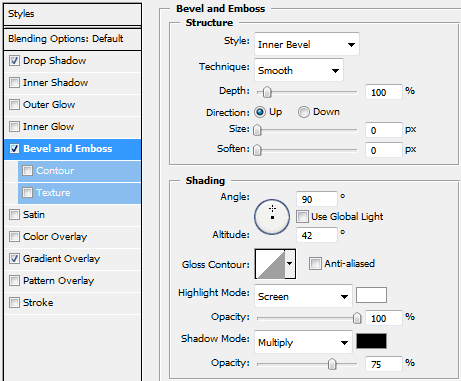
The Pixel Shadow Technique

"I’m going to go into the layers blending options (Right click the layer, “Blending Options”). From here I’m going to Add a Drop Shadow, and then set it up so that the Size is set to “0″, and the Distance is set to”1px”. "
Monday, May 3, 2010

Smart Columns w/ CSS & jQuery

<ul class="column">
        <!--Repeating list item-->
        <li>
            <div class="block">
             <!--Content-->
            </div>
        </li>
       <!--end repeating list item-->
</ul>
ul.column{
 width: 100%;
 padding: 0;
 margin: 10px 0;
 list-style: none;
}
ul.column li {
 float: left;
 width: 200px; /*Set default width*/
 padding: 0;
 margin: 5px 0;
 display: inline;
}
.block {
 height: 355px;
 font-size: 1em;
 margin-right: 10px; /*Creates the 10px gap between each column*/
 padding: 20px;
 background: #e3e1d5;
}
.block h2 {
 font-size: 1.8em;
}
.block img {
        /*Flexible image size with border*/
 width: 89%;  /*Took 1% off of the width to prevent IE6 bug*/
 padding: 5%;
 background:#fff;
 margin: 0 auto;
 display: block;
 -ms-interpolation-mode: bicubic; /*prevents image pixelation for IE 6/7 */
}
function smartColumns() { //Create a function that calculates the smart columns

        //Reset column size to a 100% once view port has been adjusted
 $("ul.column").css({ 'width' : "100%"});

 var colWrap = $("ul.column").width(); //Get the width of row
 var colNum = Math.floor(colWrap / 200); //Find how many columns of 200px can fit per row / then round it down to a whole number
 var colFixed = Math.floor(colWrap / colNum); //Get the width of the row and divide it by the number of columns it can fit / then round it down to a whole number. This value will be the exact width of the re-adjusted column

 $("ul.column").css({ 'width' : colWrap}); //Set exact width of row in pixels instead of using % - Prevents cross-browser bugs that appear in certain view port resolutions.
 $("ul.column li").css({ 'width' : colFixed}); //Set exact width of the re-adjusted column

}

smartColumns();//Execute the function when page loads

$(window).resize(function () { //Each time the viewport is adjusted/resized, execute the function
 smartColumns();
});
reference: http://www.sohtanaka.com/web-design/smart-columns-w-css-jquery/
Sunday, May 2, 2010
Determining Browser
JQuery:
classes:
.browserIE
.browserIE6
.browserIE7
.browserIE8
.browserChrome
.browserChrome1
.browserSafari
.browserSafari1
.browserSafari2
.browserSafari3
.browserMozilla
.browserFirefox
.browserFirefox1
.browserFirefox2
.browserFirefox3
.browserOpera
reference: tvidesign
PHP:
http://techpatterns.com/downloads/php_browser_detection.php
// Checks the browser and adds classes to the body to reflect it.

var a=navigator.userAgent.toLowerCase();$.browser.chrome=/chrome/.test(navigator.userAgent.toLowerCase());if($.browser.msie){$('body').addClass('browserIE');$('body').addClass('browserIE'+$.browser.version.substring(0,1))}if($.browser.chrome){$('body').addClass('browserChrome');a=a.substring(a.indexOf('chrome/')+7);a=a.substring(0,1);$('body').addClass('browserChrome'+a);$.browser.safari=false}if($.browser.safari){$('body').addClass('browserSafari');a=a.substring(a.indexOf('version/')+8);a=a.substring(0,1);$('body').addClass('browserSafari'+a)}if($.browser.mozilla){if(navigator.userAgent.toLowerCase().indexOf('firefox')!=-1){$('body').addClass('browserFirefox');a=a.substring(a.indexOf('firefox/')+8);a=a.substring(0,1);$('body').addClass('browserFirefox'+a)}else{$('body').addClass('browserMozilla')}}if($.browser.opera){$('body').addClass('browserOpera')}
classes:
.browserIE
.browserIE6
.browserIE7
.browserIE8
.browserChrome
.browserChrome1
.browserSafari
.browserSafari1
.browserSafari2
.browserSafari3
.browserMozilla
.browserFirefox
.browserFirefox1
.browserFirefox2
.browserFirefox3
.browserOpera
reference: tvidesign
PHP:
http://techpatterns.com/downloads/php_browser_detection.php
CSS Reset
body,div,dl,dt,dd,ul,ol,li,h1,h2,h3,h4,h5,h6,pre,form,fieldset,input,textarea,p,blockquote,th,td { margin:0; padding:0; }
table { border-collapse:collapse; border-spacing:0; }
fieldset,img { border:0; }
address,caption,cite,code,dfn,em,strong,th,var { font-style:normal; font-weight:normal; }
ol,ul { list-style:none; }
caption,th { text-align:left; }
h1,h2,h3,h4,h5,h6 { font-size:100%; font-weight:normal; }
q:before,q:after { content:''; }
a{outline:0}
On Colors
What do hues tell?
Red: energy( light ), power/elegance (dark)
Red: energy( light ), power/elegance (dark)
Orange: friendly, inviting
Yellow: Happiness (bright), calm (light)
Green: beginning, lack of experience, natural (olive), money (dull,dark)
Blue: calm, refreshing/friendly (light), strong/realiable (dark), presicion
Purple: royal, childen (bright)
Black: mysterious, sophisticated
White: simplicity
Brown: Reliable
Tan/Beige: Conservative
Cream/Ivory: Purity
Notes:
Elengacy: Same Hue + Diff Chroma
Gradients: Diff Chroma
Weak/strong, pale/pure: Change saturation
Unity: Diff Hue + Same Saturation
Stands out: Low saturation bg, high saturation element
Energetic, lively: Similar value
Max Characters in a line
For single column text, the 66-character line is considered to be ideal, with 75 characters as the maximum where readers feel comfortable reading and switching lines). For multiple column text, 40 to 50 characters is good.
CSS Line Height Property
- Typical leading set to a block of text is 50%. This means that for a font size of 12 pixels, there will be 3 pixels that are added on the top and on the bottom of each line, resulting in the line height of 18 pixels (12 pixels + (2 ∗ 3 pixels)). On the web, it's a good idea to set leading to 70% to 80%.
For example, for a line-spacing of 70% for 0.75 em font-size, line height should be:
0.75 * 1.7 = 1.275 em
- If the line height is 1.275 ems, then the space between paragraphs should be 1.275 ems as well.
- Headings can be smaller or greater than one line height (normally not greater than two line heights), but its vertical spacing should still be related to the basic leading. For example, if the heading is 24 pixels and the line height of the normal text is 18 pixels, then the line height of the heading will be 36 pixels
- Headings and subheadings can have an extra space on top equal to one half of the line height. In this case, the top margin will be equal to 3⁄2 of a line height, and the bottom margin to one line height.
em calculator
For example, for a line-spacing of 70% for 0.75 em font-size, line height should be:
0.75 * 1.7 = 1.275 em
- If the line height is 1.275 ems, then the space between paragraphs should be 1.275 ems as well.
- Headings can be smaller or greater than one line height (normally not greater than two line heights), but its vertical spacing should still be related to the basic leading. For example, if the heading is 24 pixels and the line height of the normal text is 18 pixels, then the line height of the heading will be 36 pixels
- Headings and subheadings can have an extra space on top equal to one half of the line height. In this case, the top margin will be equal to 3⁄2 of a line height, and the bottom margin to one line height.
body {
    font-size:100%;
    line-height:1.75em; /* 1 * 1.75 */
}

.bodytext p {
    font-size:0.875em;
}

.sidenote {
    font-size:0.75em;
}


body {
    font-size:16px;
}
em calculator
Javascript Objects ( reminder )
str['substr'](0, 2)
is same as
str.substr(0, 2)
It is handy for passing functions as arguments etc.
Columns of equal height
$(document).ready(function() {
    function equalHeight(group) {
        tallest = 0;
        group.each(function() {
            thisHeight = $(this).height();
            if(thisHeight > tallest) {
                tallest = thisHeight;
            }
        });
        group.height(tallest);
    }
    // how to use
    $(document).ready(function() {
        equalHeight($(".left")); // equal height all elements selected
    });
});
Makes all applied columns same height.
Structural Tags
<section>
<header>
<footer>
<nav>
<article>
<aside>
- When we style them with CSS, we need to be sure to include
display:block;.- Supporting IE:
  document.createElement('header');
  document.createElement('footer');
  document.createElement('section');
  document.createElement('aside');
  document.createElement('nav');
  document.createElement('article');
Cross Browser Gradient
background: #999; /* for non-css3 browsers */

filter: progid:DXImageTransform.Microsoft.gradient(startColorstr='#cccccc', endColorstr='#000000'); /* for IE */
background: -webkit-gradient(linear, left top, left bottom, from(#ccc), to(#000)); /* for webkit browsers */
background: -moz-linear-gradient(top,  #ccc,  #000); /* for firefox 3.6+ */
Internet Explorer gradient filter doesn’t support color-stop, gradient angle, and radial gradient. That means you can only specify either horizontal or vertical linear gradient with 2 colors: StartColorStr and EndColorStr.
Subscribe to:
Posts (Atom)